


A clear pricing table helps visitors compare plans and choose with confidence. This guide shows how to build an advanced custom pricing data table in Elementor using clean HTML and CSS. Copy the code and adjust the plans and features to match your offer.
Product Comparison
Compare Our Plans
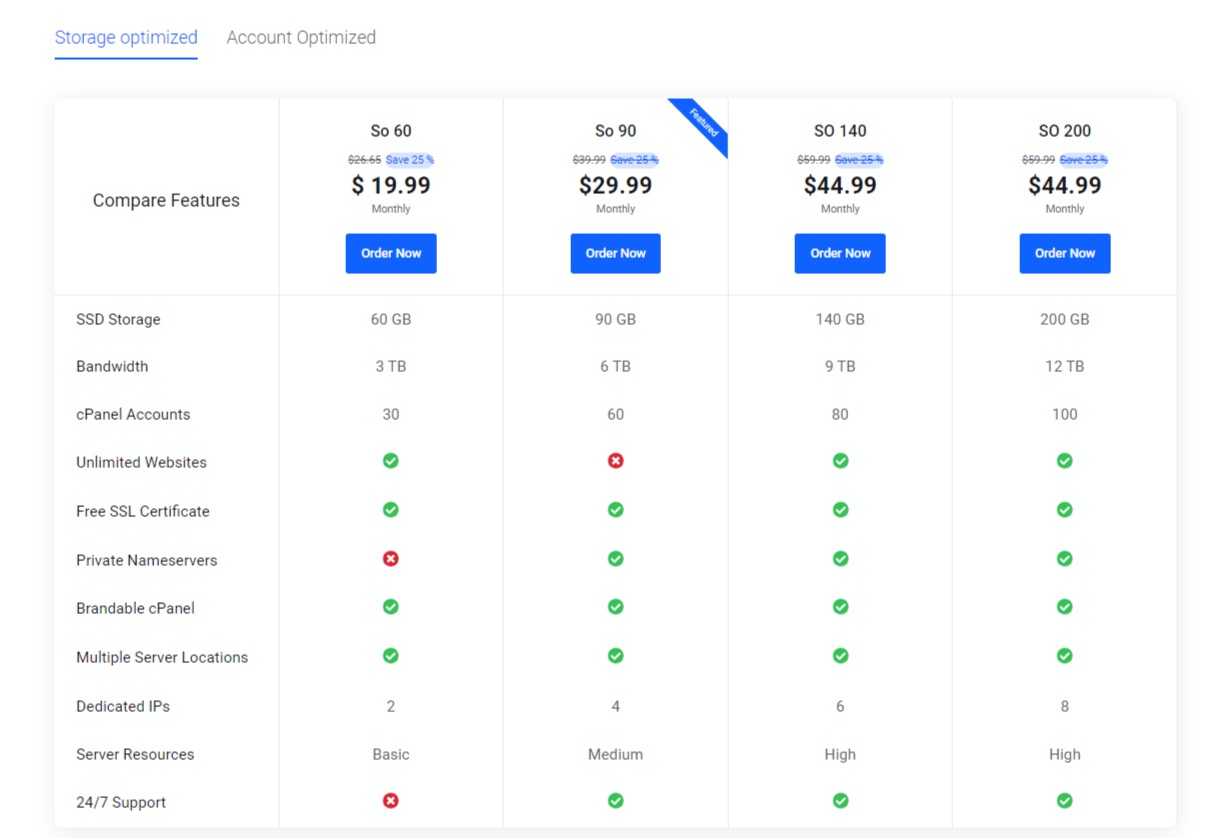
Explore the comparison of packages for our different Reseller Hosting plans to select the one that best suits your needs.
| Compare Features |
|
|
|
|
|---|---|---|---|---|
|
SSD Storage |
60 GB |
90 GB |
140 GB |
200 GB |
|
Bandwidth |
3 TB |
6 TB |
9 TB |
12 TB |
|
cPanel Accounts |
30 |
60 |
80 |
100 |
|
Unlimited Websites |
|
|
|
|
|
Free SSL Certificate |
|
|
|
|
|
Private Nameservers |
|
|
|
|
|
Brandable cPanel |
|
|
|
|
|
Multiple Server Locations |
|
|
|
|
|
Dedicated IPs |
2 |
4 |
6 |
8 |
|
Server Resources |
Basic |
Medium |
High |
High |
|
24/7 Support |
|
|
|
|
| Compare Features |
|
|
|
|
|---|---|---|---|---|
|
cPanel Accounts |
60 |
90 |
140 |
200 |
|
SSD Storage |
30 GB |
60 GB |
80 GB |
120 GB |
|
Bandwidth |
3 TB |
6 TB |
9 TB |
12 TB |
|
Unlimited Websites |
|
|
|
|
|
Free SSL Certificate |
|
|
|
|
|
Private Nameservers |
|
|
|
|
|
Brandable cPanel |
|
|
|
|
|
Multiple Server Locations |
|
|
|
|
|
Dedicated IPs |
2 |
4 |
6 |
8 |
|
Server Resources |
Basic |
Medium |
High |
High |
|
24/7 Support |
|
|
|
|
Security & Reliability
| Table Header | ||||
|---|---|---|---|---|
|
DDoS Protection |
Standard |
Enhanced |
Enhanced |
Unlimited |
|
Malware Detection |
|
|
|
|
|
Malware Removal |
|
|
|
|
|
Proactive Server Monitoring |
|
|
|
|
|
Account Isolation |
|
|
|
|
Website Performance Features
| Table Header | ||||
|---|---|---|---|---|
|
Memory per cPanel User |
2 GB |
2 GB |
4 GB |
8 GB |
|
Cores per cPanel |
1 |
2 |
4 |
4 |
|
HTTP/3 |
|
|
|
|
|
Multiple Server Locations |
|
|
|
|
|
Redis |
|
|
|
|
|
GZIP Compression |
|
|
|
|
|
CSS/JS/HTML Minification |
|
|
|
|
Developer Features
| Table Header | ||||
|---|---|---|---|---|
|
MySQL Database |
1 |
Unlimited |
Unlimited |
Unlimited |
|
FTP Accounts |
2 |
Unlimited |
Unlimited |
Unlimited |
|
Cron Jobs |
1 |
Unlimited |
Unlimited |
Unlimited |
|
PHP Selector |
|
|
|
|
|
Application Autoupdates |
|
|
|
|
|
SSH and SFTP Access |
|
|
|
|
|
Custom Cron Jobs |
|
|
|
|
How it works
The table lays out plans in columns and features in rows, so visitors can scan across easily. CSS handles the styling, including highlighting a recommended plan and making the table scroll cleanly on small screens. Because it is custom markup, you control every detail.
Tips and customization
- Highlight your recommended plan to guide choices.
- Keep feature names short and scannable.
- Make the table horizontally scrollable on mobile.
FAQ
Is it responsive?
Yes. With a little CSS the table adapts or scrolls neatly on phones.
Can I add a buy button per plan?
Yes. Place a call to action button in each plan column.