
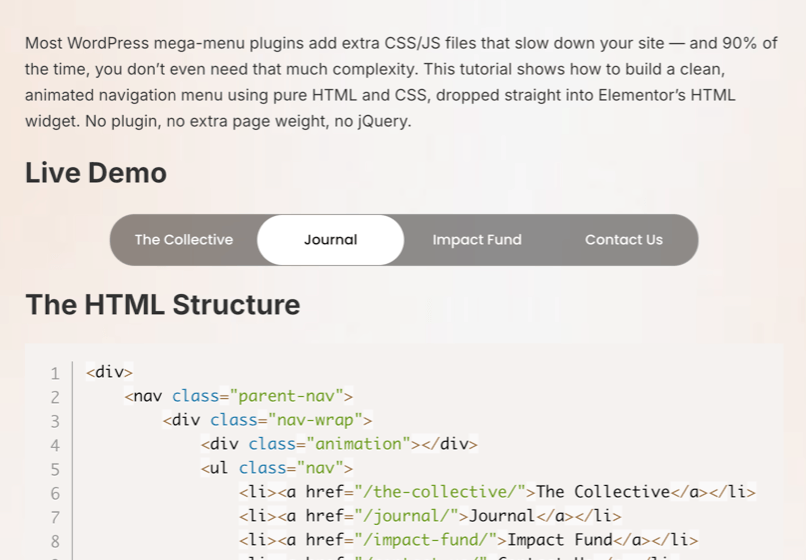
Most WordPress mega-menu plugins add extra CSS/JS files that slow down your site, and 90% of the time, you don’t even need that much complexity. This tutorial shows how to build a clean, animated navigation menu using pure HTML and CSS, dropped straight into Elementor’s HTML widget. No plugin, no extra page weight, no jQuery.
Live Demo
The HTML Structure
<div>
    <nav class="parent-nav">
        <div class="nav-wrap">
            <div class="animation"></div>
            <ul class="nav">
                <li><a href="/the-collective/">The Collective</a></li>
                <li><a href="/journal/">Journal</a></li>
                <li><a href="/impact-fund/">Impact Fund</a></li>
                <li><a href="/contact-us/">Contact Us</a></li>
            </ul>
        </div>
    </nav>

    <style>
        @import url('https://fonts.googleapis.com/css2?family=Poppins:wght@400;500;600&display=swap');

        * {
            box-sizing: border-box;
        }

        nav.parent-nav {
            width: 100%;
            max-width: 590px;
            margin: 2px auto 0;
            position: relative;
            backdrop-filter: blur(16px) saturate(180%);
            -webkit-backdrop-filter: blur(16px) saturate(180%);
            background-color: rgba(0, 0, 0, 0.5);
            border-radius: 25px;
            border: 1px solid rgba(255, 255, 255, 0.125);
            overflow: hidden;
        }

        .nav-wrap {
            position: relative;
        }

        ul.nav {
            position: relative;
            height: 50px;
            font-family: 'Poppins', sans-serif;
            font-weight: 500;
            display: flex;
            align-items: center;
            padding: 0;
            margin: 0;
            list-style: none;
            z-index: 2;
        }

        ul.nav li {
            flex: 1;
            position: relative;
            z-index: 2;
        }

        ul.nav a {
            height: 50px;
            font-size: 14px;
            display: flex;
            align-items: center;
            justify-content: center;
            text-decoration: none;
            color: white;
            transition: color 0.3s ease;
            position: relative;
            z-index: 2;
        }

        ul.nav li.active a,
        ul.nav li.hover a {
            color: black;
        }

        .animation {
            position: absolute;
            top: 0;
            left: 0;
            width: 0;
            height: 50px;
            border-radius: 25px;
            background-color: #ffffff;
            opacity: 0;
            transition: all 0.35s ease;
            z-index: 1;
        }

        html {
            scroll-behavior: smooth;
        }
    </style>

    <script>
        document.addEventListener('DOMContentLoaded', () => {
            const nav = document.querySelector('.nav');
            const navItems = document.querySelectorAll('.nav li');
            const navLinks = document.querySelectorAll('.nav li a');
            const animation = document.querySelector('.animation');

            let activeItem = null;
            let hasInteracted = false;

            function moveAnimation(target) {
                if (!target) {
                    animation.style.width = '0px';
                    animation.style.left = '0px';
                    animation.style.opacity = '0';
                    return;
                }

                animation.style.width = target.offsetWidth + 'px';
                animation.style.left = target.offsetLeft + 'px';
                animation.style.opacity = '1';
            }

            function setActive(targetItem) {
                navItems.forEach(item => item.classList.remove('active'));

                if (targetItem) {
                    targetItem.classList.add('active');
                    activeItem = targetItem;
                    moveAnimation(targetItem);
                } else {
                    activeItem = null;
                    moveAnimation(null);
                }
            }

            navItems.forEach(item => {
                item.addEventListener('mouseenter', () => {
                    navItems.forEach(i => i.classList.remove('hover'));
                    item.classList.add('hover');
                    moveAnimation(item);
                });
            });

            nav.addEventListener('mouseleave', () => {
                navItems.forEach(i => i.classList.remove('hover'));
                moveAnimation(activeItem);
            });

            navLinks.forEach(link => {
                link.addEventListener('click', () => {
                    hasInteracted = true;
                    setActive(link.parentElement);
                });
            });

            window.addEventListener('scroll', () => {
                hasInteracted = true;
            }, { passive: true });

            const sections = [...navLinks]
                .map(link => document.querySelector(link.getAttribute('href')))
                .filter(Boolean);

            const observer = new IntersectionObserver((entries) => {
                if (!hasInteracted) return;

                const visibleSections = entries.filter(entry => entry.isIntersecting);
                if (!visibleSections.length) return;

                const mostVisible = visibleSections.sort((a, b) => {
                    return b.intersectionRatio - a.intersectionRatio;
                })[0];

                const id = mostVisible.target.id;
                const matchedLink = document.querySelector(`.nav a[href="#${id}"]`);

                if (matchedLink) {
                    setActive(matchedLink.parentElement);
                }
            }, {
                threshold: 0.5
            });

            sections.forEach(section => observer.observe(section));

            setActive(null);
        });
    </script>
</div>
How It Works
- Flexbox layout,
display: flexwithgapkeeps menu items evenly spaced without margin hacks. - The underline animation, the
::afterpseudo-element starts atwidth: 0and expands to100%on hover, powered entirely by a CSStransition. No JavaScript involved. - Brand color on hover, the link color and underline both shift to the accent color, giving instant visual feedback.
- Responsive fallback, on smaller screens,
flex-wrap: wrapstacks the items instead of squeezing them into one row.
How to Add This in Elementor
- Drag an HTML widget onto your section.
- Paste the HTML code above into the widget.
- Go to your theme’s Custom CSS panel (or Elementor’s page-level Custom CSS) and paste the CSS.
- Replace the menu labels and
hreflinks with your own pages. - Adjust
#DF4826to match your own brand color if needed.
Customization Ideas
- Add a dropdown by nesting a
<ul>inside a<li>and showing it with:hover. - Swap the underline for a background-fill animation by animating
background-sizeinstead ofwidth. - Use
clamp()onfont-sizefor smoother scaling across breakpoints instead of a hard media query.
Final Thoughts
A hand-coded menu like this loads instantly, has zero plugin dependency, and gives you full control over the animation, exactly the kind of lightweight approach that keeps Elementor sites fast. If you want this built into your live site with your exact brand styling, feel free to reach out, I build custom Elementor components like this regularly.
ARTICLE END
Ready to make it work?
I can help turn the idea into a reliable WordPress experience.
Start a conversation ↗