

Add a Copy Post Link Button in Elementor
Giving readers a one click way to copy your post link makes sharing effortless. This guide shows how to add a copy link button in Elementor using a small piece of JavaScript.
Read guideJournal
Practical tutorials, comparisons and ideas from years of building WordPress websites. Most guides include code you can copy and a live demo.

Giving readers a one click way to copy your post link makes sharing effortless. This guide shows how to add a copy link button in Elementor using a small piece of JavaScript.
Read guide
A card carousel is a clean way to show testimonials, products, or featured posts in a compact, swipeable row.
Read guide
Want your Elementor cards, buttons, or sections to really grab attention? An animated gradient border is one of the cleanest ways to do it, a glowing, rotating color edge that runs on pure CSS , with no plugin and no JavaScript.
Read guide
When you use an Elementor popup as a mobile menu, it often stays open after a visitor taps a link, which feels clunky.
Read guide
Changing a section background image when a visitor clicks a control makes a page feel dynamic and interactive. This guide shows how to swap an Elementor section background on click using a Click ID and simple JavaScript.
Read guide
Validating a ZIP or postal code before a form is submitted keeps your data clean and avoids bad entries. This guide shows how to check ZIP validity in a Piotnet Form for Elementor with custom code.
Read guide
Letting visitors click a piece of text to swap an image makes your page interactive and engaging. In this tutorial you will build that effect in Elementor using a small amount of JavaScript.
Read guide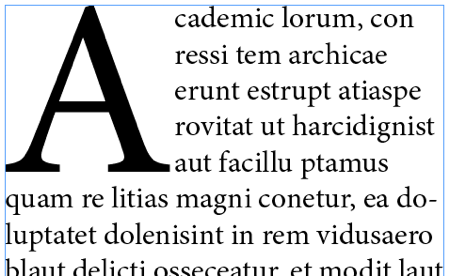
A drop cap, the large decorative first letter of a paragraph, adds an elegant editorial touch to your articles. This guide shows how to create a stylish drop cap in WordPress using Elementor and CSS.
Read guide
The hamburger icon is the standard trigger for mobile menus, and animating it into an X on click makes your navigation feel polished. This guide shows how to build a responsive, animated hamburger menu in Elementor.
Read guide
A flip card is a fun, interactive way to show extra information, the card rotates in 3D to reveal a back side on hover. The best part? You can build it in Elementor with pure CSS : no plugin and no JavaScript.
Read guide
Most WordPress mega-menu plugins add extra CSS/JS files that slow down your site, and 90% of the time, you don’t even need that much complexity.
Read guide
A custom mouse cursor adds a distinctive, modern touch to your website and makes the experience feel more interactive. This tutorial shows how to create a custom cursor effect in Elementor with a little CSS and JavaScript.
Read guide
A styled scrollbar is a small detail that makes a design feel finished and cohesive. This guide shows how to add a custom scrollbar to any Elementor container with simple CSS. Copy the code, match your colors, and refine the look.
Read guide
Default slider arrows and dots do not always match your design. Customizing the slider or carousel buttons in Elementor lets you create controls that fit your brand perfectly. This guide shows how to style them with a little CSS.
Read guide
A well animated button invites clicks and makes your calls to action feel alive. This guide shows how to create a smooth button hover animation in Elementor with custom CSS. Copy the code and apply it to any button to add polish.
Read guide
A custom thank you message after a form submission reassures visitors and can guide their next step. This guide shows how to display a personalized thank you message in Elementor after someone submits your form.
Read guide
Choosing a WordPress page builder often comes down to two strong names: Elementor , the most popular builder in the world, and Bricks , a newer, developer-loved builder known for clean, fast code.
Read guide
The glassmorphism, or glassy, effect gives cards and sections a frosted, semi transparent look that feels modern and premium. This guide shows how to create it in Elementor with a few lines of CSS.
Read guide
By default, Elementor form select fields can look empty or unclear without a prompt. Adding a placeholder option guides users on what to choose and improves your form experience.
Read guide
Video backgrounds usually play muted, which means visitors miss the audio. Adding a sound on and off button lets them choose to listen, improving the experience.
Read guide
A highlight behind key words in a heading draws attention and adds personality to your titles. This guide shows how to create a highlight heading in Elementor with a custom code snippet.
Read guide
A safer look at WordPress administrator access, account recovery, and why secret backdoors put sites at risk.
Read guide
A smoke text effect makes letters drift and dissolve like vapor, adding a striking, animated touch to headings. This guide shows how to create it in Elementor using simple HTML and CSS, with a live demo.
Read guide
Popups are great for offers, sign ups, and announcements, and building custom dynamic ones gives you full control over design and behavior. This guide shows how to create custom dynamic popups in Elementor using CSS and JavaScript.
Read guide
Gradient text instantly makes headings feel modern and premium. With Elementor Pro and a few lines of custom CSS you can apply a smooth color gradient to any heading, no images required.
Read guide
Sometimes you want visitors to download data as a JSON file directly from your site, without a server round trip. This guide shows how to generate and download a JSON file from a website using simple JavaScript.
Read guide
With TranslatePress, translating is the easy part.
Read guide
Learn how to keep anchor-linked sections visible below a fixed or sticky header using one reusable CSS scroll offset.
Read guide
Gradient text is an easy way to make headings pop without using images. This guide shows the simplest method to apply a color gradient to text in Elementor using CSS.
Read guide
The HTML mark tag is a simple, semantic way to highlight important words, like a text highlighter on paper. This guide shows how to use it in Elementor and style it with CSS so your highlights match your brand.
Read guide
A scrolling image marquee is a smooth way to show logos, partners, or a gallery in a continuous moving strip. This guide shows how to create an image marquee in Elementor with simple HTML and CSS.
Read guide
An animated particle background adds depth and movement to hero sections without heavy images. This guide shows how to add a particle effect in Elementor using CSS and JavaScript.
Read guide
A play button that gently pulses draws the eye straight to your video or audio content. In this tutorial you will build one in Elementor using nothing but CSS, so it stays lightweight and works on any device.
Read guide
Making your WordPress site multilingual is one of the easiest ways to reach a global audience. Two of the most popular plugins for this are Polylang and TranslatePress .
Read guide
Every WordPress page builder asks you to make the same trade: build fast now, and accept that your pages live inside a proprietary format you can never fully leave. Shilpi is my attempt to remove that trade entirely.
Read guide
Showing different text as a visitor hovers over tabs makes a section feel interactive and saves space. This guide shows how to change paragraph text on tab hover in Elementor using a small JavaScript snippet.
Read guide
A text marquee adds movement to your page by scrolling a line of text across the screen, perfect for announcements, offers, or headlines.
Read guide
Adding a language switch to your WordPress site does not always require a heavy plugin. With a little JavaScript and jQuery you can swap text on the fly and give visitors a lightweight translation option.
Read guideNo guides match that search.
Need help with your site?
If a tutorial is close to what you need, I can build the full solution for you.
Prefer email? f@mojibur.com