


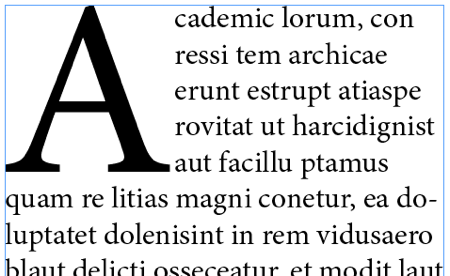
A drop cap, the large decorative first letter of a paragraph, adds an elegant editorial touch to your articles. This guide shows how to create a stylish drop cap in WordPress using Elementor and CSS. Copy the code and give your first letter some personality.
Add this Custom CSS in Elementor
class: dropcap
					.dropcap::first-letter {
  float: left;
  font-size: 2em;
  line-height: 0.85;
  padding-right: 0.12em;
  padding-top: 0.05em;
  font-weight: 700;
}
How it works
The effect uses the first letter pseudo element to target only the opening character of a paragraph. CSS then enlarges it, floats it to the left, and adjusts the line height so the surrounding text wraps neatly around it. No manual markup is needed.
Tips and customization
- Change the drop cap size to be bolder or subtler.
- Add a brand color or gradient to the letter.
- Apply it only to specific paragraphs using a CSS class.
FAQ
Does it affect every paragraph?
Only the ones you target. Use a class so it applies exactly where you want.
Do I need Elementor Pro?
No. The CSS works on the free version through Site Settings.