


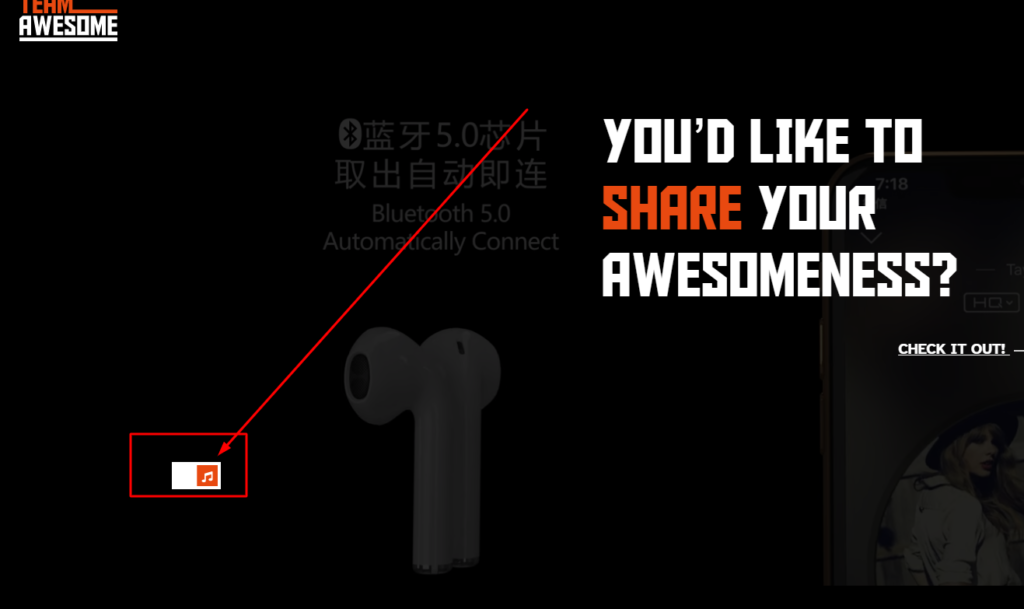
Video backgrounds usually play muted, which means visitors miss the audio. Adding a sound on and off button lets them choose to listen, improving the experience. This guide shows how to add a sound button to Elementor video backgrounds.
Important:
Your .sectionvideo section’s video tag should have the muted attribute initially (the browser needs this for autoplay to work):
					<style>
  .toggleSwitch {
    width: 35px;
    height: 35px;
    position: relative;
    display: flex;
    align-items: center;
    justify-content: center;
    background-color: transparent;
    border-radius: 50%;
    border: 1.5px solid rgb(120, 113, 101);
    cursor: pointer;
    transition-duration: .3s;
    box-shadow: none;
    overflow: hidden;
  }
  #checkboxInput {
    display: none;
  }
  .speaker-container {
    position: relative;
    width: 100%;
    height: 100%;
    display: flex;
    align-items: center;
    justify-content: center;
  }
  .speaker-base,
  .speaker-with-volume {
    position: absolute;
    width: 18px;
    height: 18px;
    transition: opacity 0.3s ease;
  }
  .speaker-base {
    opacity: 1;
  }
  .speaker-with-volume {
    opacity: 0;
  }
  #checkboxInput:checked + .toggleSwitch .speaker-base {
    opacity: 0;
  }
  #checkboxInput:checked + .toggleSwitch .speaker-with-volume {
    opacity: 1;
  }
  #checkboxInput:active + .toggleSwitch {
    transform: scale(0.7);
  }
  #checkboxInput:hover + .toggleSwitch {
    background-color: transparent;
    border-color: rgb(94, 84, 79);
  }
</style>

<!-- 🔘 Toggle Switch -->
<input type="checkbox" id="checkboxInput">
<label for="checkboxInput" class="toggleSwitch">
  <div class="speaker-container">
    <!-- Muted state: only speaker -->
    <div class="speaker-base">
      <svg xmlns="http://www.w3.org/2000/svg" viewBox="0 0 75 75">
        <path d="M39.389,13.769 L22.235,28.606 L6,28.606 L6,47.699 L21.989,47.699 L39.389,62.75 L39.389,13.769z"
              style="stroke:rgb(120,113,101);stroke-width:5;stroke-linejoin:round;fill:rgb(120,113,101);">
        </path>
      </svg>
    </div>

    <!-- Unmuted state: speaker with volume bars -->
    <div class="speaker-with-volume">
      <svg xmlns="http://www.w3.org/2000/svg" viewBox="0 0 75 75">
        <path d="M39.389,13.769 L22.235,28.606 L6,28.606 L6,47.699 L21.989,47.699 L39.389,62.75 L39.389,13.769z"
              style="stroke:rgb(120,113,101);stroke-width:5;stroke-linejoin:round;fill:rgb(120,113,101);">
        </path>
        <path d="M48,27.6a19.5,19.5 0 0 1 0,21.4
                 M55.1,20.5a30,30 0 0 1 0,35.6
                 M61.6,14a38.8,38.8 0 0 1 0,48.6"
              style="fill:none;stroke:rgb(120,113,101);stroke-width:5;stroke-linecap:round">
        </path>
      </svg>
    </div>
  </div>
</label>

<!-- ⚙️ Script -->
<script>
  document.addEventListener('DOMContentLoaded', function() {
    const checkbox = document.getElementById('checkboxInput');
    const video = document.querySelector('.sectionvideo video');

    if (checkbox && video) {
      // Initial state: muted
      video.muted = true;

      checkbox.addEventListener('change', function() {
        video.muted = !this.checked;
      });
    }
  });
</script>
How it works
A small script toggles the muted state of the background video when the button is clicked, switching the icon between sound on and sound off. CSS positions the control neatly over the video. Because it targets the video element directly, it responds instantly.
Tips and customization
- Position the button where it is visible but not distracting.
- Swap clear sound on and sound off icons.
- Keep the video muted by default for autoplay to work.
FAQ
Why does the video start muted?
Browsers require muted autoplay, so the video begins silent and the button lets users unmute.
Does it need a plugin?
No. A short script and some CSS handle it.