
A well animated button invites clicks and makes your calls to action feel alive. This guide shows how to create a smooth button hover animation in Elementor with custom CSS. Copy the code and apply it to any button to add polish.
In this tutorial, I’ll show you how to create a smooth Elementor button animation with a modern hover effect using simple custom CSS. You can copy and paste the code below directly into your Elementor widgets to instantly upgrade your call-to-action buttons and make your site feel more interactive and professional.
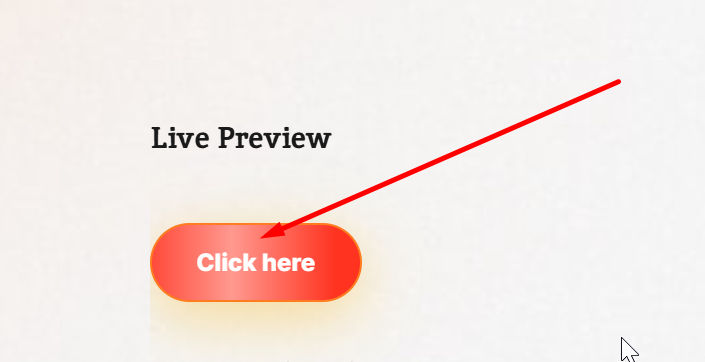
Live Preview
Batton animation css
.ah{
    background-image: linear-gradient(45deg,#f8bf3c,#f8bf3c,#84b7ca,#84b7ca,#f8bf3c,#f8bf3c,#84b7ca,#84b7ca,#f8bf3c,#f8bf3c,#84b7ca,#84b7ca);
    color: transparent;
    -webkit-background-clip: text;
    background-clip: text;
    animation: gradientAnimation 8s linear infinite;
    animation-direction: alternate;
    background-size: 300% 100%;
}
@keyframes gradientAnimation {
    0% {
        background-position: 0
    }

    to {
        background-position: 100%
    }
}
Live Preview 2
Container animation css
.shadow:after,.shadow:before {
    content: "";
    position: absolute;
    top: -2px;
    left: -2px;
    background: linear-gradient(45deg,#f8bf3c,#f8bf3c,#84b7ca,#84b7ca,#f8bf3c,#f8bf3c,#84b7ca,#84b7ca,#f8bf3c,#f8bf3c,#84b7ca,#84b7ca);;
    background-size: 400%;
    width: calc(100% + 4px);
    height: calc(100% + 4px);
    z-index: -1;
    animation: animate 20s linear infinite;
    border-radius: 20px
}

.shadow:after {
    filter: blur(20px)
}

@keyframes animate {
    0% {
        background-position: 0 0
    }

    50% {
        background-position: 300% 0
    }

    to {
        background-position: 0 0
    }
}
How it works
The animation uses CSS transitions on properties like background, transform, and shadow, so the button smoothly changes state on hover. A pseudo element can add a sliding fill or glow behind the label. Because it is pure CSS, it stays fast and reliable.
Tips and customization
- Adjust the transition speed for a snappier or softer feel.
- Try a sliding fill, scale, or glow on hover.
- Match the colors to your brand palette.
FAQ
Does this need Elementor Pro?
No. The hover animation is pure CSS and works on any plan.
Will it work on all buttons?
Yes. Apply the class or selector to any button you want to animate.
Ready to make it work?
I can help turn the idea into a reliable WordPress experience.
Start a conversation ↗