
Showing different text as a visitor hovers over tabs makes a section feel interactive and saves space. This guide shows how to change paragraph text on tab hover in Elementor using a small JavaScript snippet. Copy the code and connect your tabs to their content.
Learn how to change paragraph text when hovering over tabs in Elementor using a simple JavaScript snippet. In this tutorial I’ll show you the markup, the script, and exactly where to place the code so you can create smooth, interactive tab content without extra plugins.
Live example
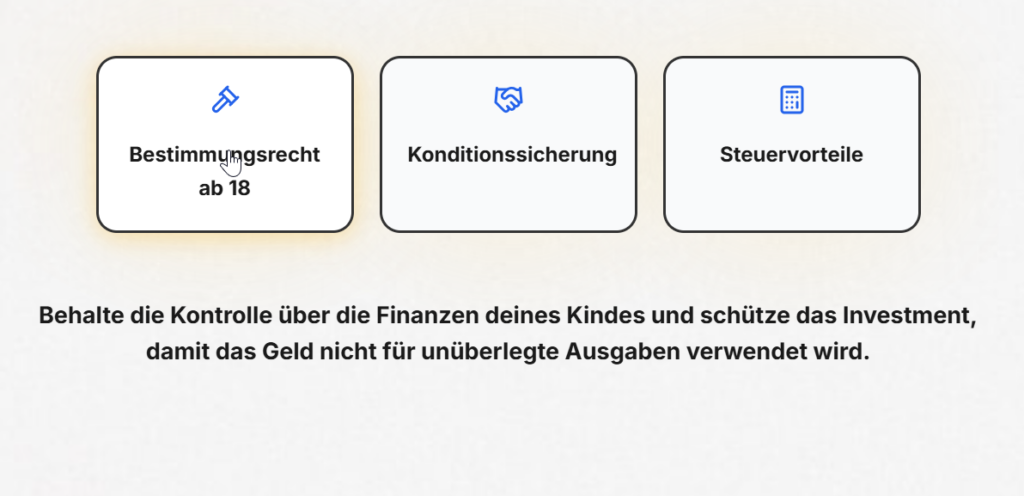
Bestimmungsrecht ab 18
Konditionssicherung
Steuervorteile
Behalte die Kontrolle über die Finanzen deines Kindes und schütze das Investment, damit das Geld nicht für unüberlegte Ausgaben verwendet wird.
Sichere deinem Investment finanzielle Stabilität, um Risiken durch zukünftige Änderungen wie Steuerreformen zu vermeiden.
Um dein Investment individuell zu gestalten, ist Flexibilität entscheidend. Bei uns kannst du deine Sparrate und Einzahlungen flexibel auf deine Lebenssituation anpassen.
CSS
<!--Container class = tb_wrap-->
<!--Icon box class = tab-->
<!--Text Class= tc -->

.tb{
    position: relative;
}

.tb:before {
    content: '';
    clip-path: ellipse(100% 100%);
    border-radius: 100%;
    position: absolute;
    width: 100%;
    height: 100%;
    filter: blur(50px);
    opacity: .2;
    z-index: -10;
    background-color: rgb(248 191 60)
}

.tb:hover > .elementor-widget-container,
.tb.active > .elementor-widget-container{
background: #FFF !important;
box-shadow: 0px 4px 20px 0px rgba(248, 191, 60, 0.40);
cursor: pointer;
}
JavaScript
<script>
jQuery(document).ready(function($) {
    // Initially hide all .tc items except the first one and set the first .tb as active
    $('.tc_wrap .tc').hide().first().show();
    $('.tb_wrap .tb').first().addClass('active');

    // Hover event for all .tb items
    $('.tb_wrap .tb').hover(function() {
        // Get the index of the hovered .tb relative to its .tb_wrap container
        var index = $(this).index('.tb_wrap .tb');

        // Remove the active class from all .tb elements and add it to the hovered one
        $('.tb_wrap .tb').removeClass('active');
        $(this).addClass('active');

        // Show the corresponding .tc based on the index and hide others
        $('.tc_wrap .tc').hide().eq(index).show();
    });
});

</script>
How it works
Each tab is linked to a block of text by a shared id or index. A short script listens for hover on a tab and swaps in the matching paragraph, hiding the others. Because it only changes which text is visible, the transition is instant and smooth.
Tips and customization
- Add a fade so the text change feels gentle.
- Set a default paragraph for when nothing is hovered.
- On mobile, switch the trigger from hover to tap.
FAQ
Does hover work on mobile?
Touch devices have no hover, so use a tap or click trigger there instead.
Does it need a plugin?
No. A small script in an HTML widget is enough.
Ready to make it work?
I can help turn the idea into a reliable WordPress experience.
Start a conversation ↗