


Popups are great for offers, sign ups, and announcements, and building custom dynamic ones gives you full control over design and behavior. This guide shows how to create custom dynamic popups in Elementor using CSS and JavaScript. Copy the code and tailor the popup to your campaign.
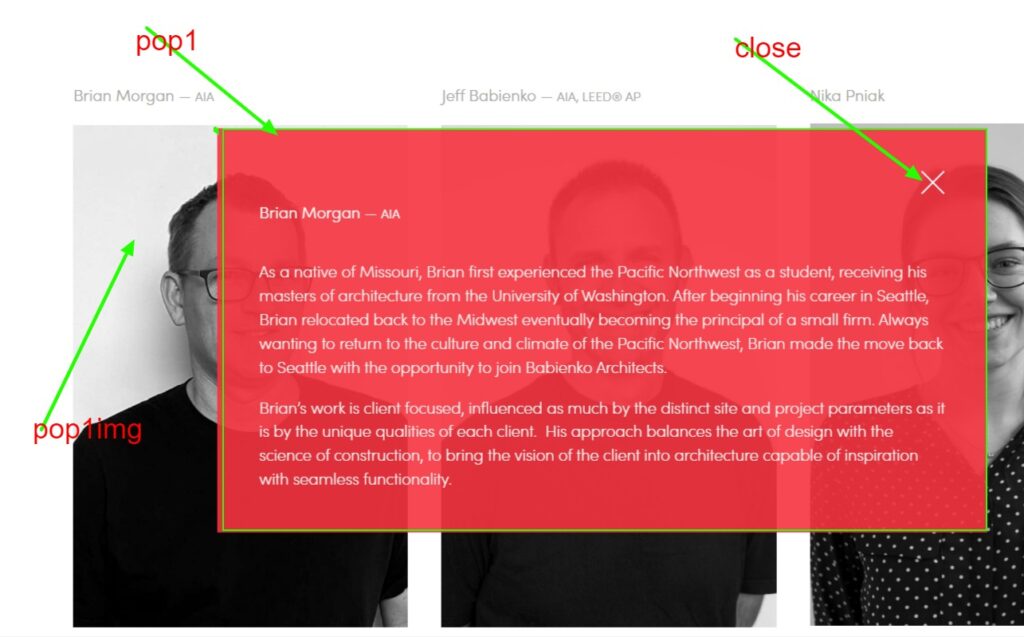
Steps 1 to Create Dynamic Popups JS
					<script data-minify="1" src="https://mojibur.com/wp-content/cache/min/1/ajax/libs/jquery/3.6.4/jquery.min.js?ver=1787414046"></script>
<script>
$(document).ready(function() {
  $(".pop1img").click(function() {
    $(".pop1").show();
  });
});

$(document).ready(function() {
  $(".close").click(function() {
    $(".pop1").hide();
  });
});
</script>
Steps 2 to Create Dynamic Popups CSS
					.pop1{
display:none;
}

.pop1img {
cursor: pointer;
}

.close{
cursor: pointer;
transition: width .6s, height .6s, transform .3s;
}
.close:hover {
transform: rotate(-45deg);
}
Alternative Optimized Code Using .toggle()
If you want to toggle the visibility instead of always showing/hiding:
					<script>
$(document).ready(function(){
    $(".pop1img").click(function(){
        $(".pop1").toggle(); // Toggles visibility
    });

    $(".close").click(function(){
        $(".pop1").hide(); // Hides when clicking close
    });
});
</script>
Optimized code for multiple Popups JS
					<script data-minify="1" src="https://mojibur.com/wp-content/cache/min/1/ajax/libs/jquery/3.6.4/jquery.min.js?ver=1787414046"></script>
<script>
$(document).ready(function() {

  for (let i = 1; i <= 8; i++) {
    $(`.popst${i}`).click(function() {
      $(`.pop${i}`).css('display', 'flex');
    });
  }

  // Handle close event for all popups
  $(".close").click(function() {
    $(".pop1, .pop2, .pop3, .pop4, .pop5, .pop6, .pop7, .pop8").hide();
  });
});
</script>
How it works
A hidden container holds the popup content, and CSS handles its appearance and transitions. A small script toggles a visible class to open and close it, often triggered by a button click or a timer. Because the logic is custom, you decide exactly when and how the popup appears.
Tips and customization
- Trigger the popup on click, on load, or after a delay.
- Add a fade or slide transition for a smoother entrance.
- Include a clear close button and an overlay click to dismiss.
FAQ
Does this need Elementor Pro?
No. Custom popups built this way rely only on your own HTML, CSS, and JavaScript.
Can I show it only once per visitor?
Yes. Store a small flag in the browser so it does not reappear on every visit.